Lift AI for FullSession
AI-driven Session Replay + analytics to fix what matters
Turn customer friction into measurable growth. Pinpoint struggles, prioritize fixes, and track results — before users drop off.

Faster root-cause — Drop-off → replay evidence
Fewer duplicate tickets — Share error-linked replays
Higher funnel completion — Fix steps with proof
Outcomes vary by setup.
Privacy-friendly analytics. GDPR, CCPA & PCI supported. Sensitive input masked.
What is FullSession?
FullSession helps teams see where users struggle, prioritize fixes, and measure impact by using session replay, heatmaps, funnel & conversion analysis, error tracking, and feedback tools.
See: replay + heatmaps show what happened
Measure: funnels + errors show where it broke
Fix: feedback + evidence links align teams on what to do next
CHOOSE YOUR PATH
Built for how your team works
Product, PLG teams
Improve activation and adoption.
- Identify where new users struggle in onboarding and core flows
- Prioritize improvements that move activation and retention
Growth, CRO, RevOps
Increase conversion without wasted experiments.
- See why users drop off, not just where
- Focus on the highest-impact
friction points
Engineering, QA
Reproduce issues fast and prioritize by impact.
- Connect errors to real user sessions for faster debugging
- Reduce back-and-forth across Product, QA, Support
AI-guided optimization
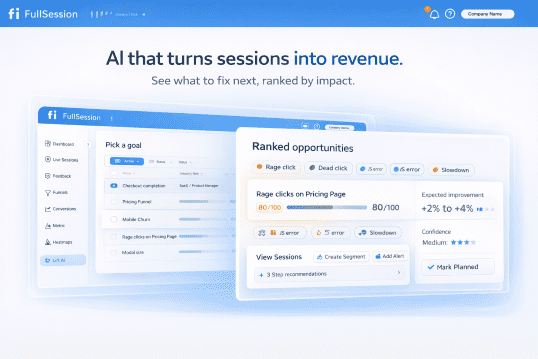
Lift AI — your impact engine
Lift AI helps you identify the highest-impact friction and prioritize what to fix next—so teams stop guessing and move faster.
- Ranks friction by likely impact on key outcomes
- Explains why it matters, evidence plus context
- Helps track outcomes over time, so wins do not fade into opinions









Tools
Everything you need to see and fix friction
Funnels and Conversions
Find where users drop off across onboarding, core flows, and checkout.
WHY FULLSESSION
Safety, security & performance built into the product
Control what’s captured, who can see it, and how it affects performance—all from one place.
Data masking and blocking where it matters most
Control exactly what FullSession can see. Use configurable masking rules to hide fields like passwords, payment details, and private messages at capture so sensitive values never leave the browser. Block entire elements or pages from recording when needed, while still capturing surrounding behavior and technical signals.
– Mask sensitive inputs and text content at capture.
– Apply additional masking at playback for specific teams or workflows.
– Block specific elements or entire pages from being recorded.

Role-based access, SSO, and audit logs
Give each team the access they need—no more, no less. Use role-based permissions and SSO to align with your identity provider, then rely on audit logs to see who accessed which projects and sessions. It’s the governance layer security teams expect from an enterprise tool.
– Define roles and permissions following least-privilege principles.
– Connect SSO so access follows your existing identity policies.
– Review audit logs to see who accessed what and when.

Built to stay out of the way
FullSession’s SDK is designed to be lightweight and asynchronous, so it doesn’t block the critical rendering path. Use sampling, efficient compression, and configurable capture settings to keep overhead low—especially on high-traffic or performance-sensitive pages.
– Async loading to stay out of the critical rendering path.
– Configurable sampling for high-traffic environments.
– Compression and efficient encoding to reduce bandwidth impact.

TEAMS
How teams use FullSession
See the friction
Watch real sessions and patterns across key flows.
Prioritize fixes
Use evidence and impact context to choose the next best change.
Track results
Monitor whether friction drops and outcomes improve over time.
VP Product, Mid-market B2B SaaS
“We stopped debating opinions. FullSession shows the friction and helps us prioritize the next fix with confidence.”
Engineering Lead, Ecommerce Brand
“Error alert to exact session in seconds. It aligned the team on what to fix first—and cut the back-and-forth.”
SOLUTIONS
Explore more
Go deeper with vertical-specific solutions and pricing details.
See what’s hurting your customer journeys most
Get in touch with the FullSession team for a personalized demo.
Enterprise-grade Security and Compliance
Protect sensitive data with configurable masking and blocking, so teams get visibility without exposing private values.
Use role-based access, SSO, and audit logs for governance, and rely on a lightweight, asynchronous SDK designed to stay out of the critical rendering path.
Safety and Security
FullSession FAQs
Quick answers to common questions about session replay, analytics, and Lift AI.
How fast can I see value with FullSession?
Install the snippet (using Google Tag Manager or manually), invite teammates, and get first replays and heatmaps within minutes.
Is FullSession just session replay?
No. Session replay is the visual layer, FullSession also includes heatmaps, funnels, error analysis, and in-app feedback so you can understand what happened and why.
What is Lift AI?
Lift AI helps identify the highest-impact friction, prioritize what to fix next, and track outcomes over time.
What is FullSession used for?
FullSession helps teams find where users struggle, prioritize improvements, and track whether changes actually improved key outcomes across critical funnels.
How do Product and Growth teams decide what to fix next?
Teams use evidence from replay, funnels, heatmaps, errors, and feedback, then apply impact context to focus on the friction points most likely to change outcomes. With Lift AI, teams can simplify the entire process. As an expert agent, Lift AI analyzes all relevant data and provides recommendations, ranked by issue severity and predicted impact of the fix.
Can Engineering and QA connect errors to real user sessions?
Yes. FullSession can connect errors to the sessions where they occurred, helping teams reproduce issues faster and align on what to fix first.
Where can I learn about integrations?
See the Integrations page to connect FullSession to your stack and move from insight to action.