.svg)

Bring FullSession into the AI tools your team already uses.
Ask from Claude or Cursor, get answers grounded in real sessions, and move from ranked issues to drafted tickets without leaving your AI workflow.
.svg)






What you can just ask
Ask in the words your team already uses and get an answer grounded in real sessions—not another dashboard to interpret.

Find the sessions behind friction.
Surface rage clicks after checkout, payment errors, failed searches, and every session connected to the problem.

Ask what is costing revenue.
Find the pages leaking revenue and explain the drop-off between critical funnel steps.

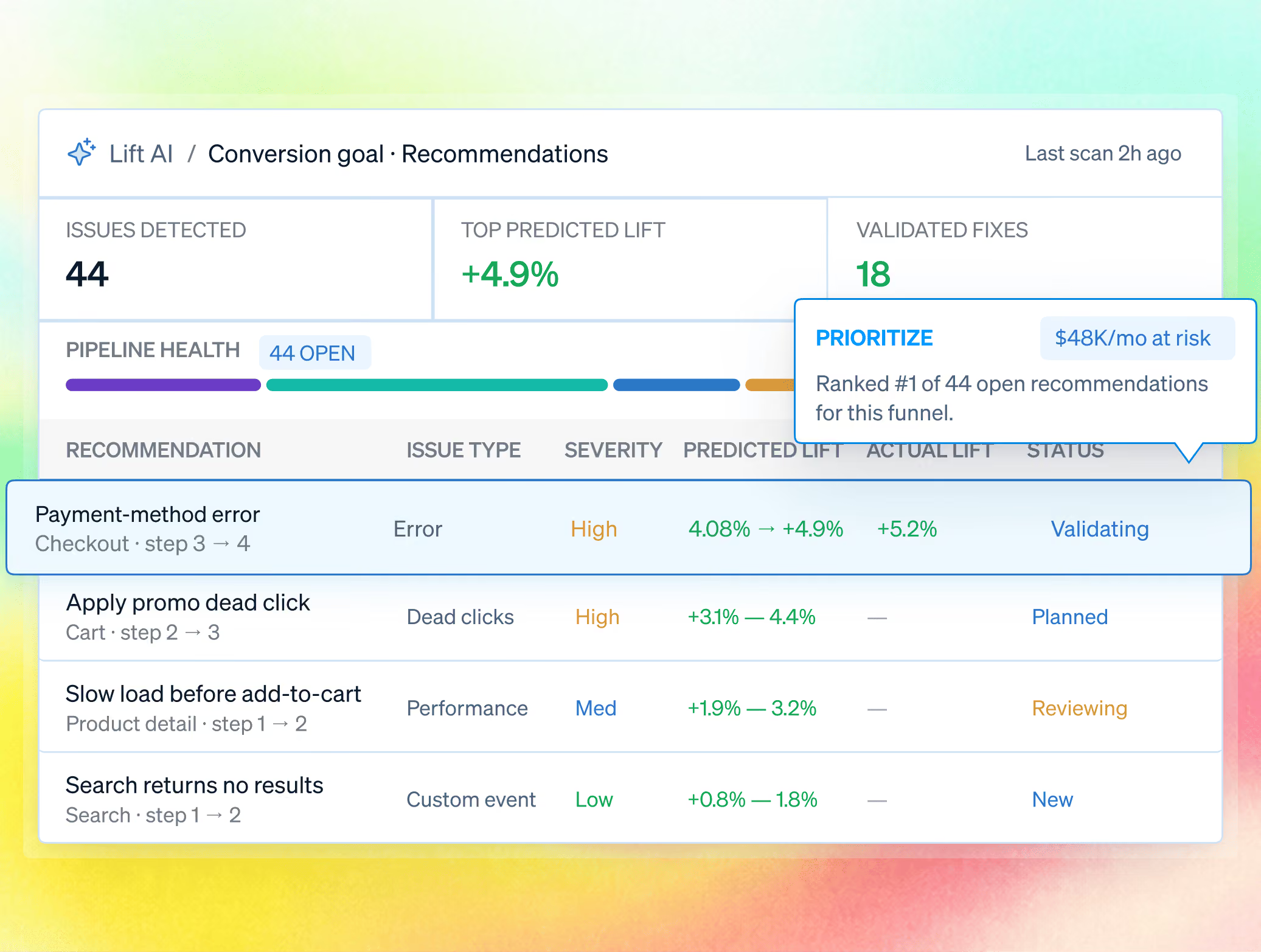
Rank and act on priorities.
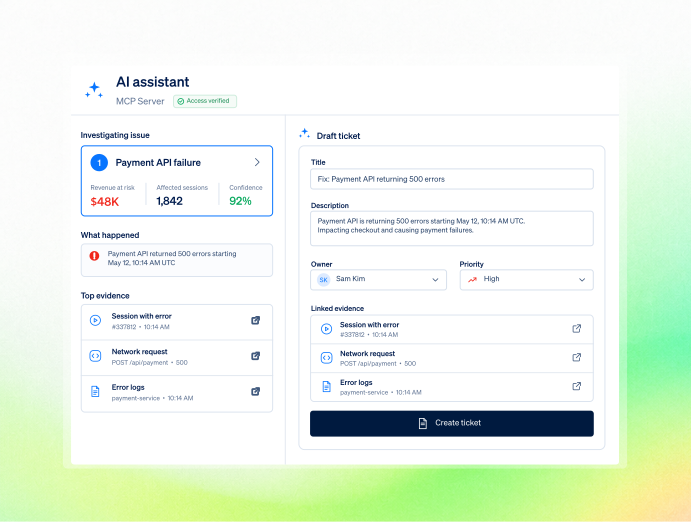
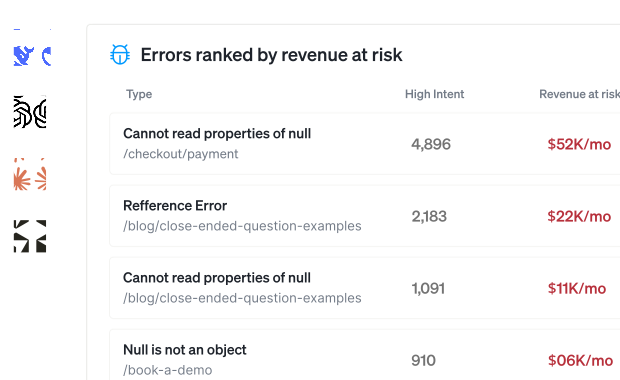
Order UX issues by predicted revenue impact, attach the session evidence, and draft the tickets to fix them.
Connect your tools to AI through a single, open protocol.
Find, inspect, analyze, prioritize, and act on real experience data from the AI tools your team already uses.
Find and inspect sessions, analyze trends, cluster errors, estimate revenue at risk, pull ranked Lift AI priorities, and draft tickets.
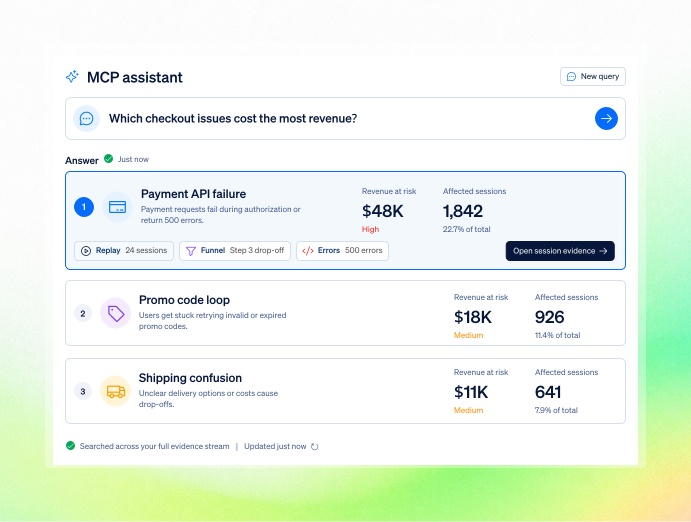
Add the FullSession MCP server URL, sign in through the browser, and start asking—no config files or keys to paste.
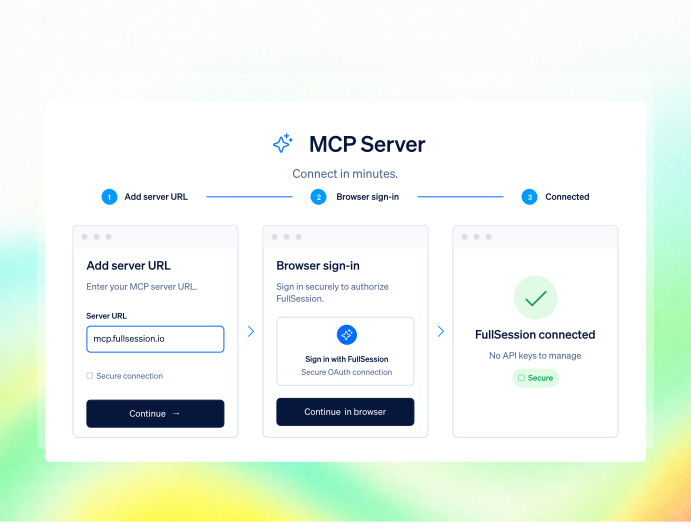
Use Claude Desktop, Claude Code, Cursor, or any remote-MCP client with browser sign-in; every request inherits and re-checks FullSession permissions.
Prioritize by revenue impact — Reach the same captured stream that powers replay, heatmaps, funnels, errors, and feedback.

Who uses MCP
Engineering, product, and growth teams ask from the tools they already use and get ranked session evidence without building another report.

.avif)

Pull session and error context into the tool you are already coding in, and draft the ticket without leaving it.

Ask what is holding a goal back and get the ranked answer with the evidence attached.
.avif)
.avif)

Ask which pages are leaking revenue this week without building a report.
.avif)
.avif)
Is MCP safe for sensitive data?
Your capture rules, sign-in controls, and account permissions carry through to every assistant request.

Masking, exclusions, and consent are enforced in the browser. Deliberately identified values remain visible exactly as they do elsewhere in FullSession.

OAuth uses short-lived tokens with no keys to rotate; the assistant sees only the account, sites, and teams the signed-in user can access.

RBAC, SSO/SAML, audit logs, US or EU residency, and summarized metadata—not a raw replay stream—keep assistant access controlled.
Teams use FullSession to turn behavior into proven outcomes.
"FullSession shows us exactly where users get stuck without digging through hours of recordings. It’s where we start when we know there’s something wrong and needs fixed. It was easy to launch and the FullSession team is super responsive and helpful."

12x
5x

Frequently Asked Questions.
A secure bridge that lets an AI assistant work with your FullSession data on your behalf, in plain language, and take action on what it finds.
Claude Desktop, Claude Code, and Cursor, plus any client supporting remote MCP servers with browser sign-in.
You add the server URL, the client registers itself, and your normal FullSession sign-in opens in the browser. Short-lived tokens, no keys to manage.
Yes. Those rules are enforced at capture, so protected content never reaches FullSession or your assistant.
Only the account, sites, and teams the signed-in user can already access, re-checked on every request.
Yes. Alongside finding, inspecting, and analyzing sessions, it can act on what it finds, including drafting tickets for the fixes it recommends.
Put your session data one question away.
Connect your client in minutes and ask the first question the same day.
.svg)


.svg)
.svg)
212 E Stone Path St Derby, KS 67037 Phone: +1 415-649-4222



All systems operational.